

Wave has created this handy, step-by-step guide for moving house and staying connected. Helpful information for changing broadband providers and canceling contracts.
If you’re thinking of moving home or are already in the process, staying connected should be high on your list of priorities; Whether that means switching your internet provider or keeping your current service. According to Uswitch data the average wait time for your broadband to be connected is 8 days when making the move; This leads to 1 in 3 people using up their mobile data during this time.
Here is a step-by-step guide for keeping online when moving home.
Step 1: Check the network coverage for your new address
Broadband coverage varies, so it’s important to check providers before you move, as it could mean your current service is not available. If you need to switch, knowing who provides cover in your area will help make the decision.
You can check coverage by address here; Coverage Checker
Step 2: Check the Speed
The speed of your internet is important to ensure you can do the things you need to do when online around the home. Not every provider offers the same speeds, so you need to check this for your location.
With much of our lives dependent on a good internet connection, speeds are now a key factor people are looking at before moving into a property; so much so that it could affect the saleability of your home in the future.
How to test your speed before moving in?
It is possible to check broadband speed before you move to ensure your needs will be met. This information could be vital if you rely on good download speeds for work, for business or if you have multiple users in your household.

Step 3: Decide if you want to switch or stay
If you’re happy with your current internet service provider and they have coverage in your new area, then the choice to stay with them can seem straightforward. However, there could still be a delay in connection when moving so it’s worth looking at your options.
If you are unhappy with your existing broadband, or coverage is unavailable when you move, then switching is the best option. Price is no longer the only factor to selecting a broadband provider, with many people switching to local, more reliable companies that provide good customer service.
Should you be moving into your first home but are unsure which provider to choose, the list below should help you make a decision.
5 things to consider when making a decision on your broadband:
- Coverage, which providers offer availability. This is the biggest factor in rural areas as you could be limited.
- Speed, the transfer rate can vary greatly depending on the type of connection & location. You should also factor in the number of users of your household. Your connection will be faster if you are the only user compared to having multiple users (especially at the same time).
- Cost, higher speeds mean higher prices, so you need to base this on the importance of speed to you. Cheapest isn’t always best, so what you’re willing to pay should be determined by your needs.
- Reliability, interrupted service can be very frustrating and stressful. The best way to check out reliability is to find user reviews in your area.
- Customer service, if there is a problem with your connection or your bill, the level of customer service will determine how quickly things get resolved.
Which companies give the best customer service?
Any contact you have with your broadband provider will affect how you feel about them. Good service means having queries answered quickly by knowledgeable and caring staff, and any issues resolved to your satisfaction.
Gauging the level of customer service you will receive is difficult before using any company, but there is data available to give you an idea how they are likely to perform.
Reliable sources of independent customer reviews such as Trustpilot help you shop with more confidence.
| Internet Service Provider | Trustpilot Score |
| Wave Internet | 4.7 |
| TalkTalk | 2.5 |
| Virgin Media | 2.1 |
| Plusnet | 1.8 |
| EE | 1.8 |
| BT | 1.6 |
| Sky | 1.5 |
| Vodafone | 1.5 |
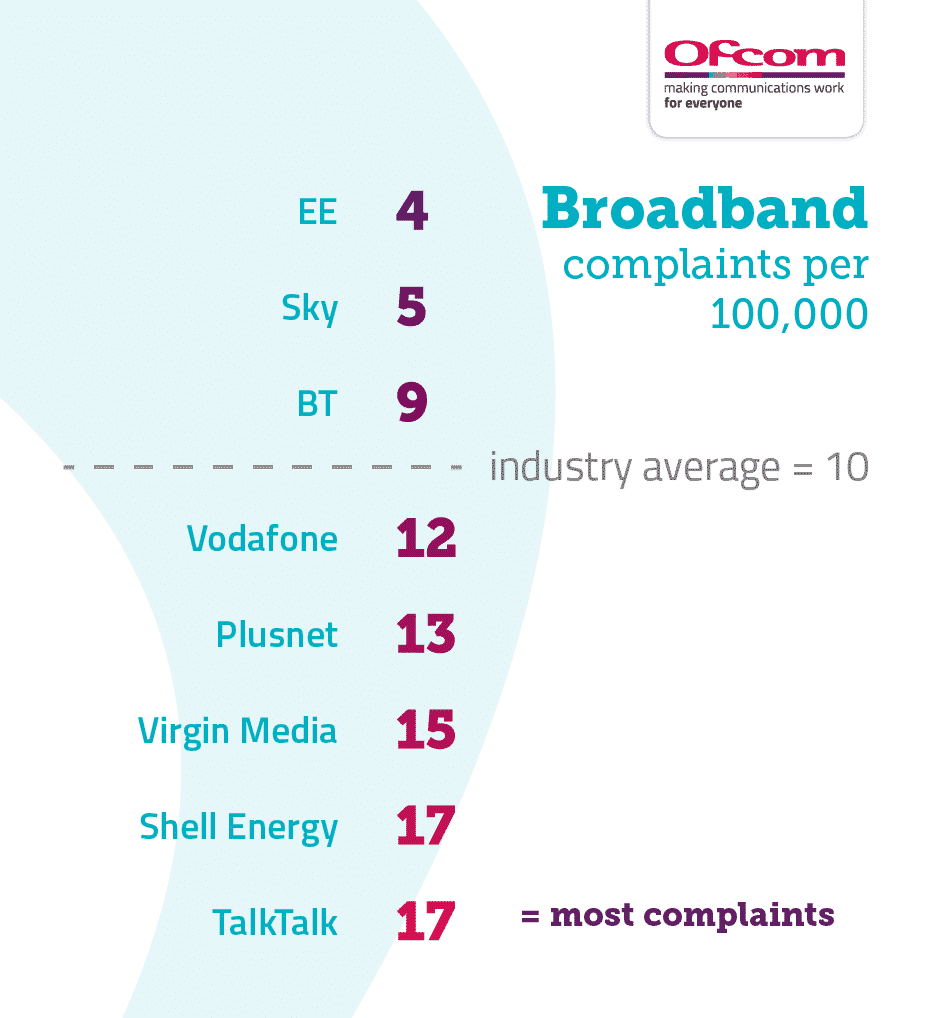
The number of complaints registered can also be a fair indicator of customer satisfaction. According to the latest complaints data published by Ofcom, the provider with the least issues reported (per 100k customers) was EE.
Step 4: Check the terms of your contract
If you are still under contract when you plan to move, some providers will charge an early termination fee even if their service is not available in your new area. Checking the terms of your contract will clarify what you need to do if switching or cancelling. Your options are more open if the term is ending, or if the current broadband provider does not charge an exit fee.
Pros & Cons to staying with your current provider
| Pros of staying with your current provider | Cons of staying with your current provider |
| Keep your current deal/contract | Coverage may be worse or nonexistent in your new area. |
| Easier to keep your email address & phone number (if applicable). | You may pay a higher tariff by staying with your existing company. |
| Know what to expect in terms of service | New home may not have the infrastructure to support your current provider. |
| You don’t have to go through a switching process | If you’re unhappy with the current service, it isn’t likely to change. |
Pros & Cons to switching to a new provider
| Pros of switching provider | Cons of switching provider |
| New customers almost always get better deals. | You may be charged an early cancellation fee if still under contract. |
| Potentially save money by getting a cheaper tariff. | You will need to find a new deal & follow the switching process. |
| Coverage may be faster in your new home. | You may need to pay an installation charge. |
| You may be offered quicker speeds. | You could need an engineer visit. |
| It typically takes less than an hour of admin time to switch providers. (Depending on how long they keep you waiting on the phone). | You could lose your email address if it’s specific to your old provider. |
Cancellation Fees & Notice Periods
Make sure to also check your contract for any cancellation charges you will be subject to and what notice period you need to give your current provider. Most will charge a fee if ending your contract early, even if their service is not available in the area you are moving to.
Step 5: Book an Installation Date
If your new home does not have the existing connections to support the provider you’ll be using, then an engineer will need to visit the property to install them. To be without the internet for the shortest period possible means pre-planning. Booking a time that suits you and is available can be a challenge; so the sooner you address this, the smoother things will run. This typically takes up to 2 weeks to arrange in advance.
Below is a table of the average days without connection to bear in mind.
How quickly can I get my internet installed?
| Internet Provider | Average days without connection |
| Wave Internet | 2 (fast track ) |
| Virgin Media | 6.6 |
| Vodafone | 7.3 |
| Sky Broadband | 7.7 |
| EE | 8.1 |
| BT | 8.6 |
| TalkTalk | 9.4 |
| Plusnet | 9.9 |
Step 6: Connect your devices and configure any settings
Once your new internet connection is up and running, you will need to connect all your devices. Make sure you have any passwords available but secure, you can use a reputable password app like Dashlane or RememBear. Most routers will have the password written on then, but it is a good idea to change this for security.
There are two main ways to connect your devices to the internet, either via Wi-Fi (most common) or directly to your router via an ethernet cable. It’s worth understanding these connections are different and can have different speeds. Wi-Fi is typically used for any devices you move around with like a mobile phone. A direct connection to your router can be useful for fixed devices like a desktop and provides a faster, more reliable & secure internet source.
Broadband for new builds
With proposals from the government now in place, nearly all new build properties will come with a broadband connection ready to install. However, it is always worth checking with the developer when purchasing what type of cable has already been laid. This will determine what options are available to you in terms of internet providers before you move in. Housing developments in remote or rural areas may require a solution that doesn’t use traditional copper wire or phone lines.
Broadband for remote areas
Getting a fast internet connection can be a challenge if you are moving to a rural or remote area, due to the infrastructure being limited or simply not there. You may need to look at a specialist broadband provider that does not use the traditional methods of phone lines or copper wire. There are other options available to ensure you still receive fast internet in remote areas using new technologies to beam high-speed internet without the need for wires.
Do I need a landline?
It is possible to get broadband without the need for a phone line. Many providers will push the fact that internet packages come with free line rental/calls. The truth is home phone lines are not used to the extent they once were with the growth of mobiles, this deems the internet through phone lines an outdated infrastructure.
There is no longer a need to own a landline, with many opting to use a mobile phone instead. New technologies available mean broadband is possible (and at fast speeds) without a phone line.
Consider a WIFI Booster for older homes
If your new home is an older property, there are a few considerations that could impact the quality of your broadband connection. Older homes tend to have thicker walls when compared to the much thinner stud walls of new build properties. This can affect the ability of a router to beam consistent WiFi speeds to every room in the house. A clear sign of this is if the speed is great in one room, but rubbish in another.
There is a simple solution to ensuring the best speeds to every room and even outbuildings by boosting the WiFi signal. A mesh WiFi system consists of your main router, and a series of smart nodes positioned around your home, extending the signal in different rooms. Each point-to-point node acts as a hop point to carry the signal around, so the node furthest from the router will still get a super strong signal.
How does Wave Broadband Work?
Watch our video below, then get in touch with our friendly team for a Free Site Survey.
